WRISTGRID GUIDE
See your WristGrid sleep score from Garmin data on your iPhone
Your Garmin watch provides sleep data such as duration and stages. WristGrid computes its own sleep score from that data — duration 40%, structure 30%, and efficiency 30% — then presents the score and context on your iPhone.
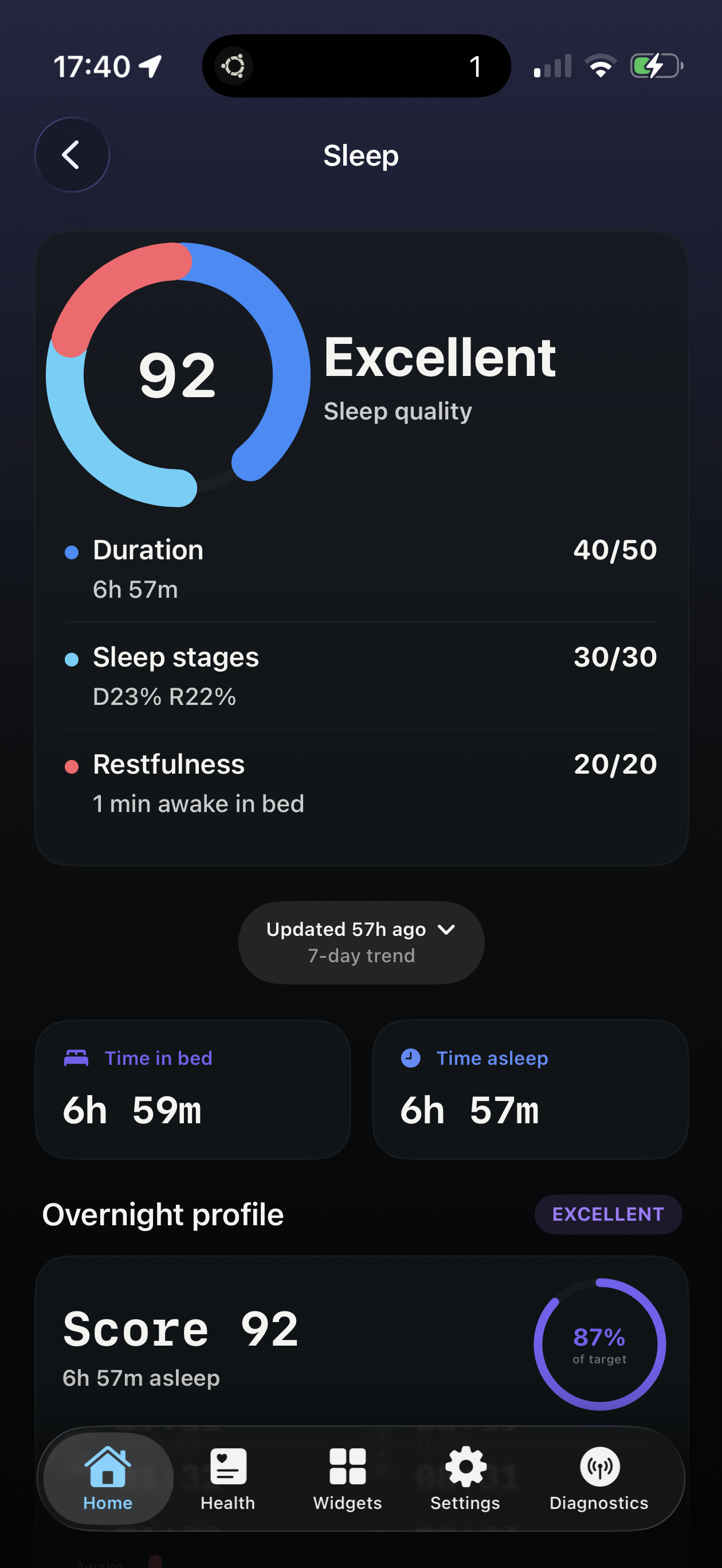
Your WristGrid sleep score from Garmin data on your iPhone, first thing in the morning.
What the sleep score means
WristGrid computes its sleep score from Garmin watch sleep data and keeps the inputs visible: duration, sleep structure, and efficiency. Resting heart rate trends can sit alongside that story as a quiet signal of how hard the night was on your body.
Without a widget, the score lives in Connect’s sleep detail — fine for deep review, slow for the first thirty seconds after your alarm.
Why glanceable sleep helps
Seeing your score on the Lock Screen or Home Screen when you wake up frames the day before email and calendar take over. High score → green light for intensity; rough night → adjust expectations early.
Many athletes pair the WristGrid sleep score with Body Battery and recovery widgets so the morning briefing is complete without opening three Connect screens.
How WristGrid shows it
WristGrid receives sleep data from your watch via GW Bridge, computes its own sleep score, and displays the result as an iPhone widget with periodic refresh. It pairs the score with duration, stages, efficiency context, and resting heart rate so you can see how well you recovered overnight.
WristGrid is an independent product and is not affiliated with, endorsed by, or sponsored by Garmin. Garmin and Connect IQ are trademarks of Garmin Ltd.
FAQ
Frequently asked questions.
How do I see my sleep score from Garmin data on my iPhone?
WristGrid computes a sleep score from Garmin watch data and shows it as an iPhone widget with periodic refresh through the GW Bridge path.
Does WristGrid show sleep stages?
Yes — it surfaces its computed sleep score with duration, stages, and efficiency context from your Garmin watch data.
How does the sleep widget refresh after a night of data?
WristGrid refreshes periodically after the night is scored, typically within 15–60 minutes as controlled by WidgetKit.
NEXT STEP
Put your Garmin metrics on your iPhone.
Now on the App Store